
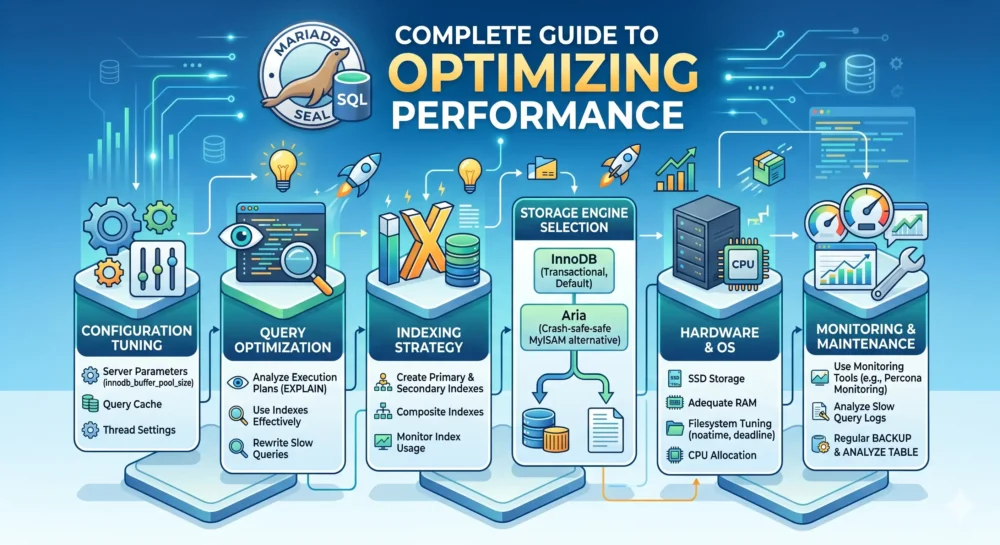
This is a comprehensive technical guide to optimizing MariaDB. Database performance depends on three pillars: Hardware/OS, Configuration (my.cnf), and Queries (Queries/Indexes).
Below, I detail each layer, focusing on the most impactful configurations.
1. Operating System (OS) Optimization
Before touching MariaDB, the environment must be prepared.
- Swappiness: The database should never use SWAP, as disk performance is drastically lower than RAM.
- Add the following to /etc/sysctl.conf:
- vm.swappiness = 10. After editing the file, run sysctl -p to apply the changes without restarting the server.RAM.
- Filesystem: Prefer XFS or ext4. XFS generally handles large volumes of data and concurrency better.
- File Descriptors: Increase the limit on open files.
- In /etc/security/limits.conf:
- mysql soft nofile 65535
- mysql hard nofile 65535
2. InnoDB Engine Optimization (my.cnf)
The configuration file usually resides in /etc/my.cnf or /etc/my.cnf.d/server.cnf. InnoDB is the default engine and the most important one to tune.
A. Memory (The Most Critical Factor)
- innodb_buffer_pool_size: This is the most important variable. It defines how much RAM MariaDB will use to cache data and indexes.
- Dedicated Server: Allocate between 60% and 80% of the total RAM.
- Shared Server (Web + DB): Allocate between 30% and 50% of the RAM, leaving space for Apache/Nginx and PHP.
- innodb_buffer_pool_instances: Divides the pool into regions to reduce thread contention.
- If the buffer pool is > 1GB, set this value equal to the number of CPU cores (up to a reasonable limit, e.g., 8 or 16).
B. Log and Write (I/O)
innodb_log_file_size: Size of redo log files. Larger values improve write performance but increase recovery time after a crash.- Recommended: 1GB to 4GB (depending on write traffic).
innodb_flush_log_at_trx_commit: Controls the ACID guarantee.- 1 (Default): Most secure. Writes to disk after every transaction. Slowest.
- 2 (Optimized): Writes to the OS cache after every transaction and to disk every second. Much faster, risk of 1 second of data loss in case of power failure (but not in case of a MySQL crash). Recommended for most web servers.
- 0: Maximum speed, highest risk.
innodb_flush_method: How MariaDB interacts with the disk.- Linux: Use O_DIRECT. This prevents the OS from caching what MariaDB has already cached, saving RAM (avoiding “double buffering”).
3. Buffers and Connections
Be careful here: many of these settings are per thread (connection). High values multiplied by many connections can cause RAM to overflow (OOM Killer).
max_connections: Do not set arbitrarily high. Use the history of simultaneous connections (Max_used_connections) and add a 20% margin.thread_cache_size: Keeps threads open for reuse.- Basic formula: 8 + (
max_connections/ 100). tmp_table_sizeandmax_heap_table_size: Should have the same value. Determine the size of temporary tables and- Recommended: 64M to 128M (Be careful not to overdo it).
4. Query Cache (Warning!)
In modern MariaDB and MySQL 8.0+, query caching is often discouraged or removed because it causes “locking” in high-concurrency environments.
- Recommendation: Disable it (query_cache_type = 0 and query_cache_size = 0) and rely on InnoDB caching or application caching (Redis/Memcached).
5. Query Optimization
No server configuration can save a poorly written query.
Slow Query Log: Enable to identify the culprits:
slow_query_log = 1
slow_query_log_file = /var/log/mysql-slow.log
long_query_time = 1  # Loga queries que demoram mais de 1 segundo
log_queries_not_using_indexes = 1 # Útil para auditoriaEXPLAIN command: Use before any heavy SELECT statement to see if indexes are being used.
- Search for type: ALL (full table scan – bad).
- Search for type: ref or eq_ref (index usage – good).
6. Automated Diagnostic Tools
Don’t try to guess. Use scripts that analyze the current state of the server and suggest adjustments.
MySQLTuner: A Perl script that analyzes uptime and suggests variables.
wget http://mysqltuner.pl/ -O mysqltuner.pl
perl mysqltuner.plNote: Run the tuner only after the server has been running for at least 24 hours to obtain accurate statistical data.
Percona Toolkit: The pt-query-digest is excellent for analyzing the slow log and generating reports on which queries consume the most resources.
Summary of my.cnf (Example for a server with 16GB RAM)
Here is a basic example (“boilerplate”) for a dedicated server with 16GB of RAM. Adjust as needed.
[mysqld]
# Basic
bind-address            = 0.0.0.0
max_connections         = 300
# InnoDB
innodb_buffer_pool_size = 10G       # ~60-70% da RAM
innodb_buffer_pool_instances = 8    # Similar to CPU Cores
innodb_log_file_size    = 2G
innodb_flush_log_at_trx_commit = 2  # Performance > ACID estrito
innodb_flush_method     = O_DIRECT
innodb_file_per_table   = 1
# Buffers (Por thread - Warning)
sort_buffer_size        = 2M
read_buffer_size        = 2M
read_rnd_buffer_size    = 8M
join_buffer_size        = 8M
# Temp Tables
tmp_table_size          = 128M
max_heap_table_size     = 128M
# Logs
slow_query_log          = 1
slow_query_log_file = /var/log/mysql-slow.log
long_query_time         = 2
log_queries_not_using_indexes = 1Click here to view our Server Management plans.
Veja Mais: Como Instalar Openlitespeed no Ubuntu 20.04
Veja Mais: Como Usar htop, iotop e Glances para Diagnóstico Rápido de Servidores Linux
Veja Mais: Como configurar lamp com wordpress e let´s encrypt
Veja Mais: Como configurar lemp com wordpress e let´s encrypt
Veja Mais: Como lidar com load alto no servidor