

CrowdSec is a new security project designed to protect virtual servers(VPS, CLOUD), dedicated servers, exposed on the Internet. CrowdSec installs an agent on the server that analyzes the logs of various applications looking for intrusion attempts. Depending on the configuration these IPs are blocked by the bounce on the server and sent to the Crowdsec network that analyzes and redistributes these IPs creating an increasingly secure and updated network. Crowdsec was inspired by Fail2Ban and aims to be a collaborative and modernized version of this intrusion prevention framework.
In Hub(click here) we found
Collections: they are packages of analyzers, scenarios, post-overflows that form a coherent set.
Configurations: are the settings that will detect the types of threats.
Bouncers: are plugins that block ips according to crowdsec “decisions” (BAN, CAPTCHA…) There are several types of integration such as iptables (default), cloudflare firewall, wordpress plugin, magento, windows server firewall and many others.
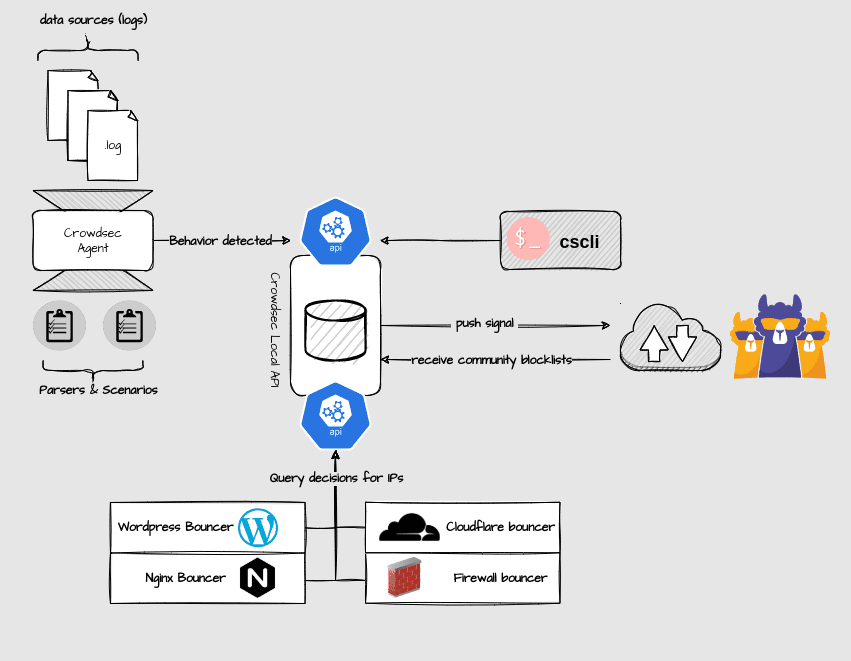
install the agent
Debian / Ubuntu
curl -s https://packagecloud.io/install/repositories/crowdsec/crowdsec/script.deb.sh | sudo bash
apt-get install crowdsec
systemctl enable crowdsec
systemctl start crowdsec
RHEL / Almalinux / Amazon Linux
curl -s https://packagecloud.io/install/repositories/crowdsec/crowdsec/script.rpm.sh | sudo bash
yum install crowdsec
systemctl enable crowdsec
systemctl start crowdsec
Install Firewall (bouncer)
crowdsec-firewall-bouncer will fetch new and old decisions from a CrowdSec API and add them to a blocklist used by supported firewalls.
You need to choose a package according to your firewall system:
To find out whether your system is using iptables or nftables, you can run the following command:
iptables -V . If you see ‘nt_tables’ mentioned in the output, you are using nftables.Remember to choose iptables below only if nt_tables does not appear for you.
Debian/Ubuntu with Iptables
curl -s https://packagecloud.io/install/repositories/crowdsec/crowdsec/script.deb.sh | sudo bash
apt install crowdsec-firewall-bouncer-iptables
systemctl enable crowdsec-firewall-bouncer
systemctl start crowdsec-firewall-bouncer
RHEL/Almalinux/Amazon Linux with Iptables
curl -s https://packagecloud.io/install/repositories/crowdsec/crowdsec/script.rpm.sh | sudo bash
yum install crowdsec-firewall-bouncer-iptables
systemctl enable crowdsec-firewall-bouncer
systemctl start crowdsec-firewall-bouncer
Debian/Ubuntu with NFTables
curl -s https://packagecloud.io/install/repositories/crowdsec/crowdsec/script.rpm.sh | sudo bash
apt install crowdsec-firewall-bouncer-nftables
systemctl enable crowdsec-firewall-bouncer
systemctl start crowdsec-firewall-bouncer
RHEL/Almalinux/Amazon Linux with NFTables
curl -s https://packagecloud.io/install/repositories/crowdsec/crowdsec/script.rpm.sh | sudo bash
yum install crowdsec-firewall-bouncer-nftables
systemctl enable crowdsec-firewall-bouncer
systemctl start crowdsec-firewall-bouncer
When installing crowdsec, “collections” of some systems that you have on your server are already pre-configured.
Run the following command and see which collections have been installed
cscli collections list
You will see something similar:

You will be able to install new collections, configurations or bouncers according to your needs through the website Hub Crowdsec(click here). Below are examples of some commonly used collections. Simply paste the line of the collection you wish to install, depending on its availability on your server.
cscli collections install crowdsecurity/nginx
cscli collections install crowdsecurity/http-cve
cscli collections install crowdsecurity/iptables
cscli collections install crowdsecurity/linux
cscli collections install crowdsecurity/linux-lpe
cscli collections install crowdsecurity/mariadb
cscli collections install fulljackz/pureftpd
cscli collections install crowdsecurity/sshd
cscli collections install crowdsecurity/wordpress
cscli collections install crowdsecurity/appsec-crs
cscli collections install crowdsecurity/dovecot
cscli collections install crowdsecurity/appsec-generic-rules
cscli collections install crowdsecurity/appsec-virtual-patching
cscli collections install crowdsecurity/appsec-wordpress
cscli collections install crowdsecurity/base-http-scenarios
cscli collections install crowdsecurity/exim
cscli collections install crowdsecurity/http-dos
cscli collections install crowdsecurity/linux-lpe
cscli collections install crowdsecurity/modsecurity
cscli collections install crowdsecurity/whitelist-good-actors
cscli collections install crowdsecurity/cpanel
cscli collections install crowdsecurity/litespeed
cscli collections install crowdsecurity/cpanel
This is one of the tools we use on our customers’ servers. Server management.
See more: How to install Glances to monitor the server
See more: Antivirus, Antimalware, Antiphishing on CentOS or Cloudlinux with ClamAV
See more: How to Install Portainer for Docker Management with Nginx Proxy Manager on Ubuntu
See more: Almalinux x Rock Linux
Veja mais: Almalinux e Rock Linux